

Routesetting software for climbing gyms
Plan your routesetting and see how climbers rate each set
Put every reset on one calendar, add the new boulders in one form and read each sector’s ratings and ascents. For boulders, routes and spraywalls.
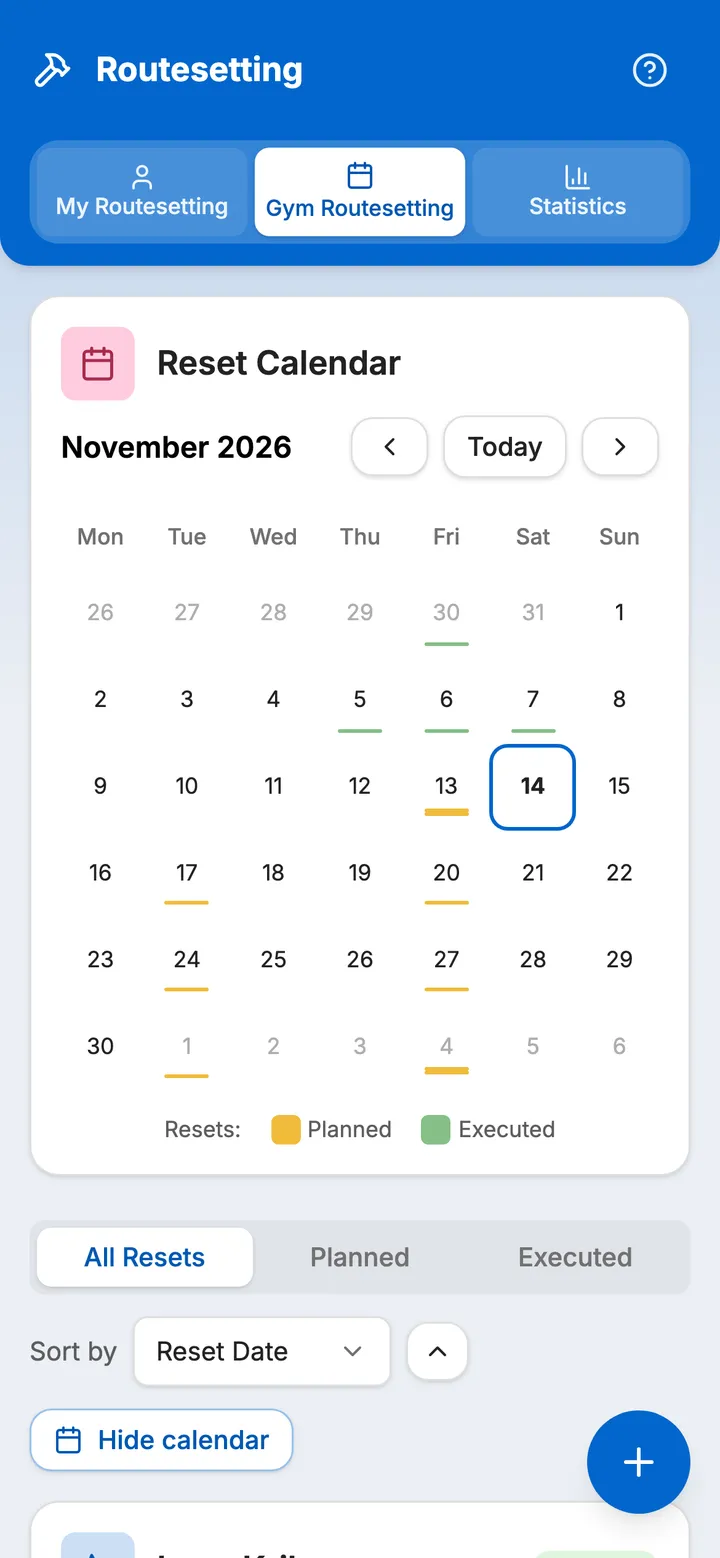
The reset schedule
Which sector comes down next, and which boulders go with it
Plan a reset for any sector on the date you choose and pick the boulders it removes. Climbers see upcoming resets in their app too. Plan the reset more than a week ahead and climbers with a project among those boulders are notified before they come down, unless they have turned boulder notifications off.
-
1 / 2: Days to the next reset
Each reset shows its date, how many boulders it removes, who planned it and how many days are left.
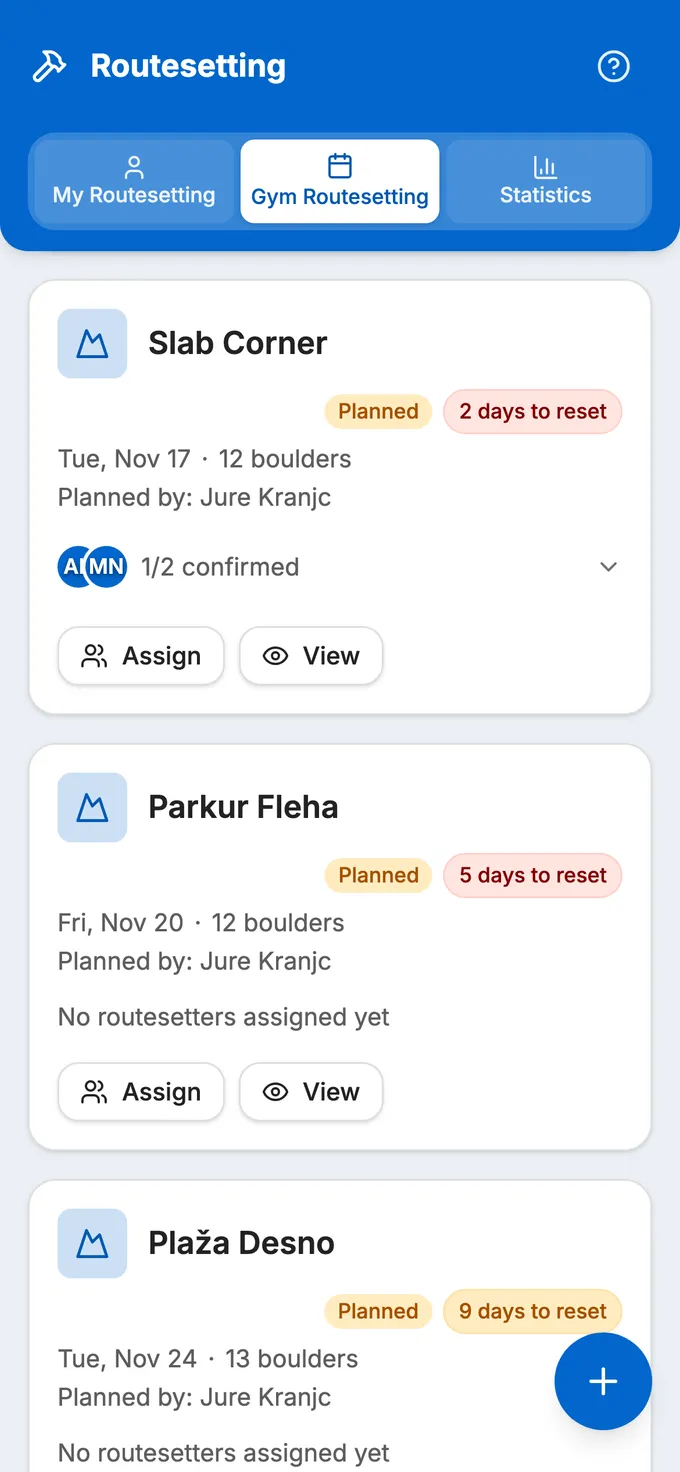
Klajmber, planned resets -
2 / 2: What comes off the wall
A planned reset lists every boulder it removes. Execute it and they come off the wall, all of them or only the ones you select; climbers’ logs and ratings stay.
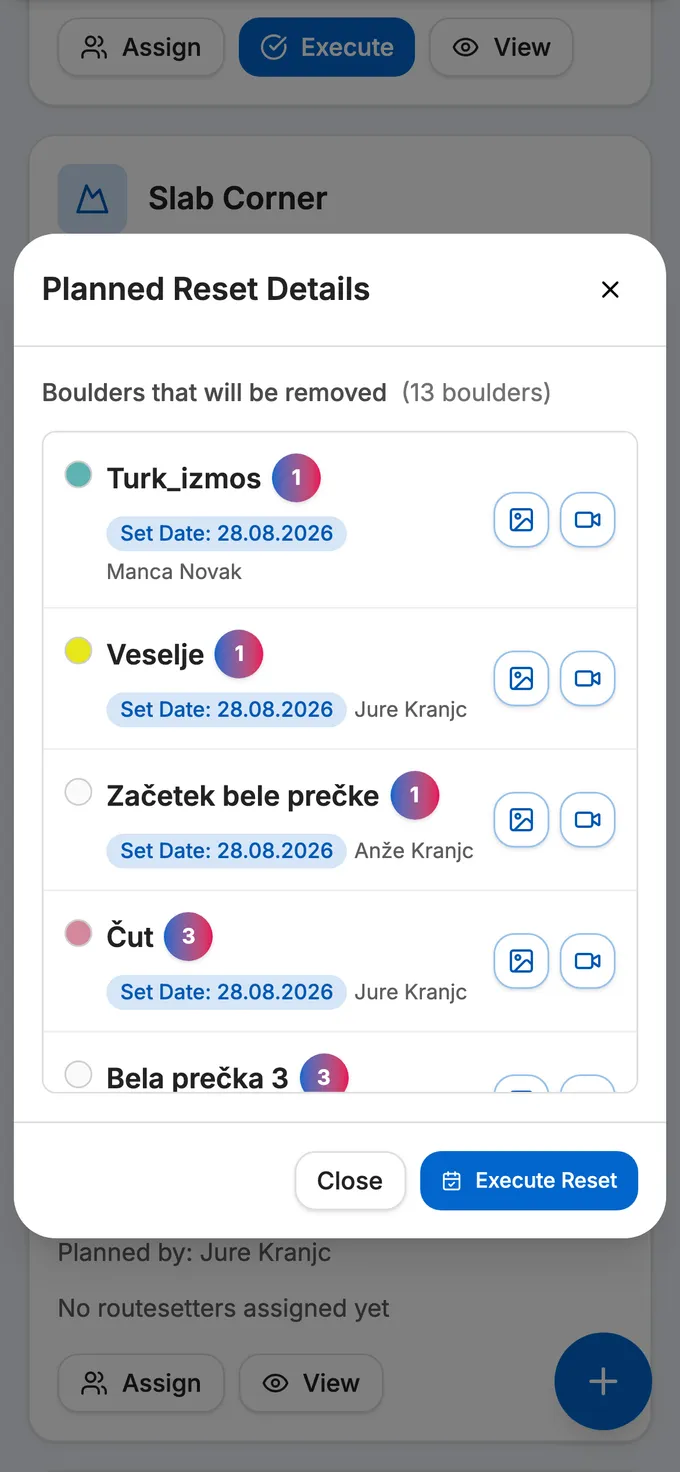
Klajmber, the Laguna Levo reset
Assigning setters. Pick the setters for a planned reset. Each one accepts or declines it in their own routesetting tab, with a reason if they decline, and the reset shows how many have confirmed.
Adding boulders
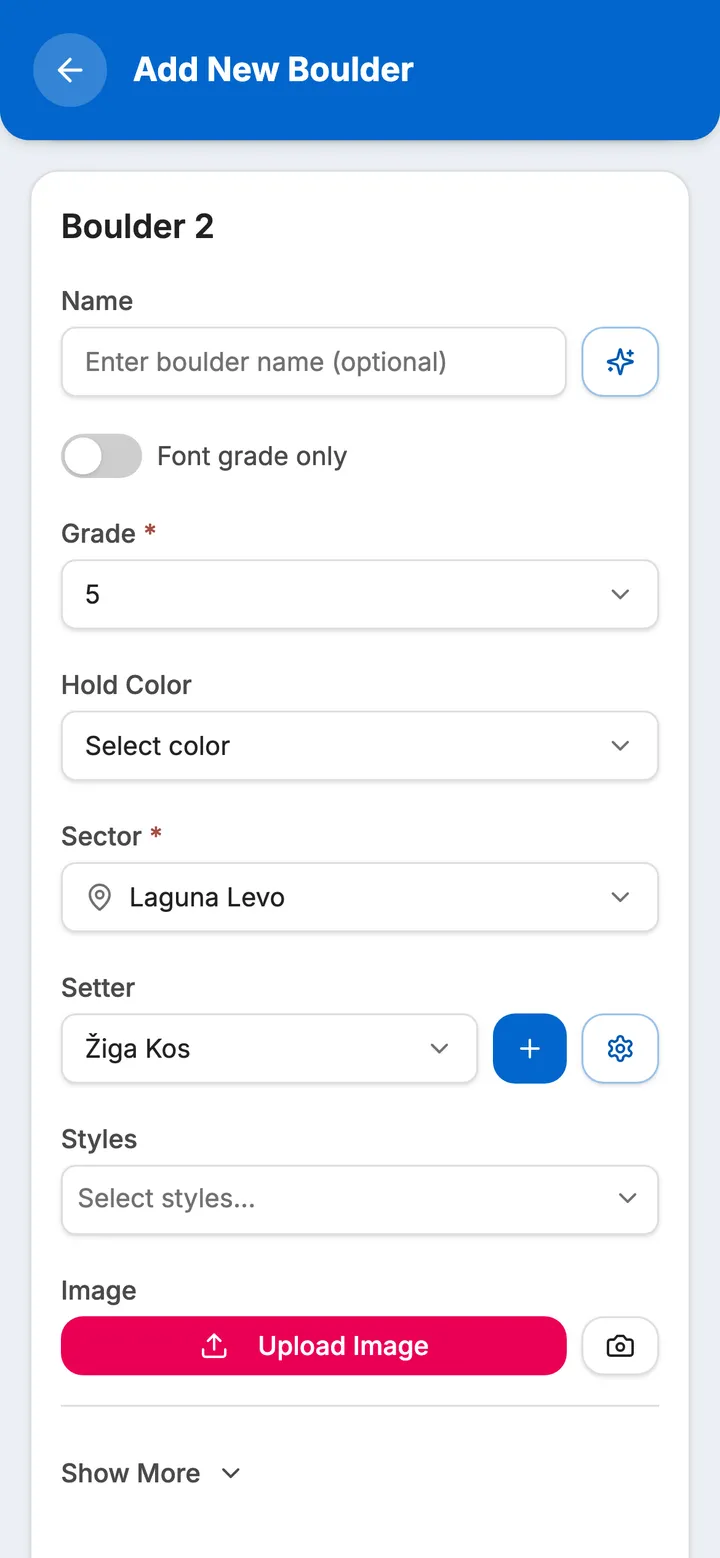
Several new boulders in one form
Add all the new boulders for a reset in one go. Each new entry starts with the grade, sector and setter of the one before, so you change only what differs. The form keeps a draft on the device until you save.
- Grade on your own scale (mapped to Font), hold colour, sector, styles and setter, guest setters included
- A planned removal date for each boulder, if you know it
- Routes with a French grade; each route takes its sector’s height, set once per sector
Print a QR card for each new boulder or route, 6 to a page, and QR codes for whole sectors, 6 or 16 to a page.
How the QR codes work, on the homepage
Hold highlight: only a boulder’s holds keep their colour on its photo
Setting for a competition? How competitions run in Balvanko
What’s on the wall
Every active boulder, by grade and by style
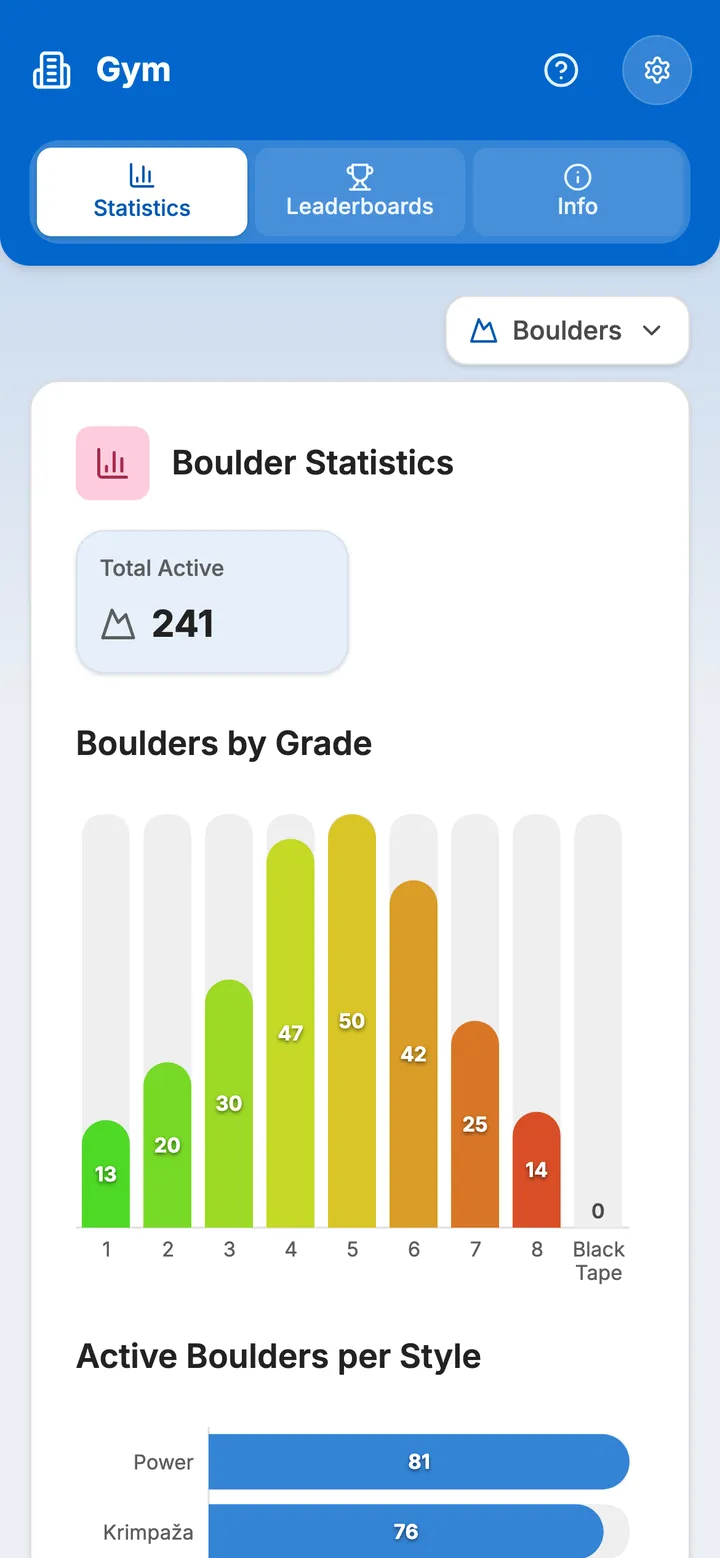
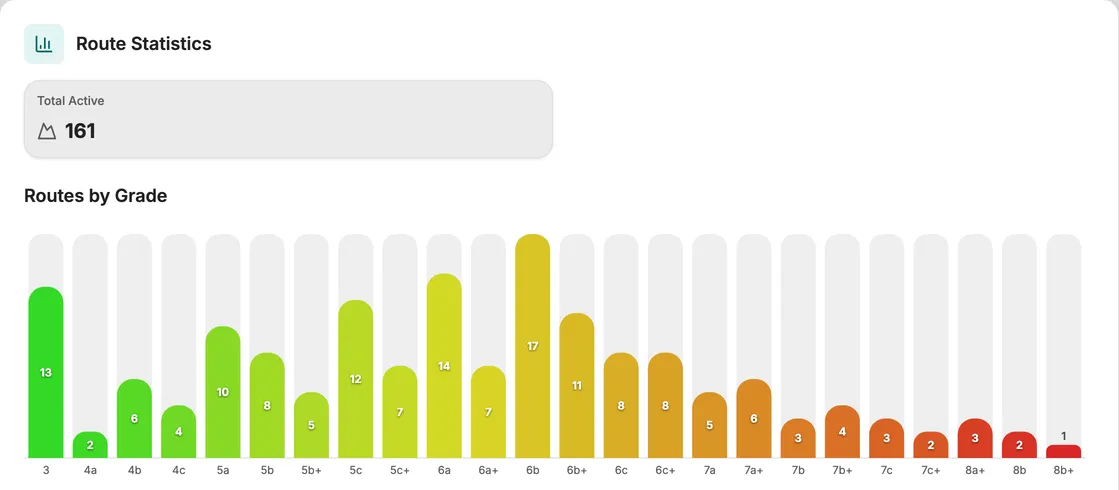
The statistics tab counts what is on the wall today: how many active boulders there are at each grade and in each style. Check it before you plan the next reset to see where the set is thin.
- Boulders by grade, from the easiest to the hardest
- Active boulders per style, in your gym’s own style names
- The same view for routes, with French grades, and for spraywall problems: pick the discipline at the top of the statistics tab
How climbers rate the sets
Ratings and ascents, sector by sector
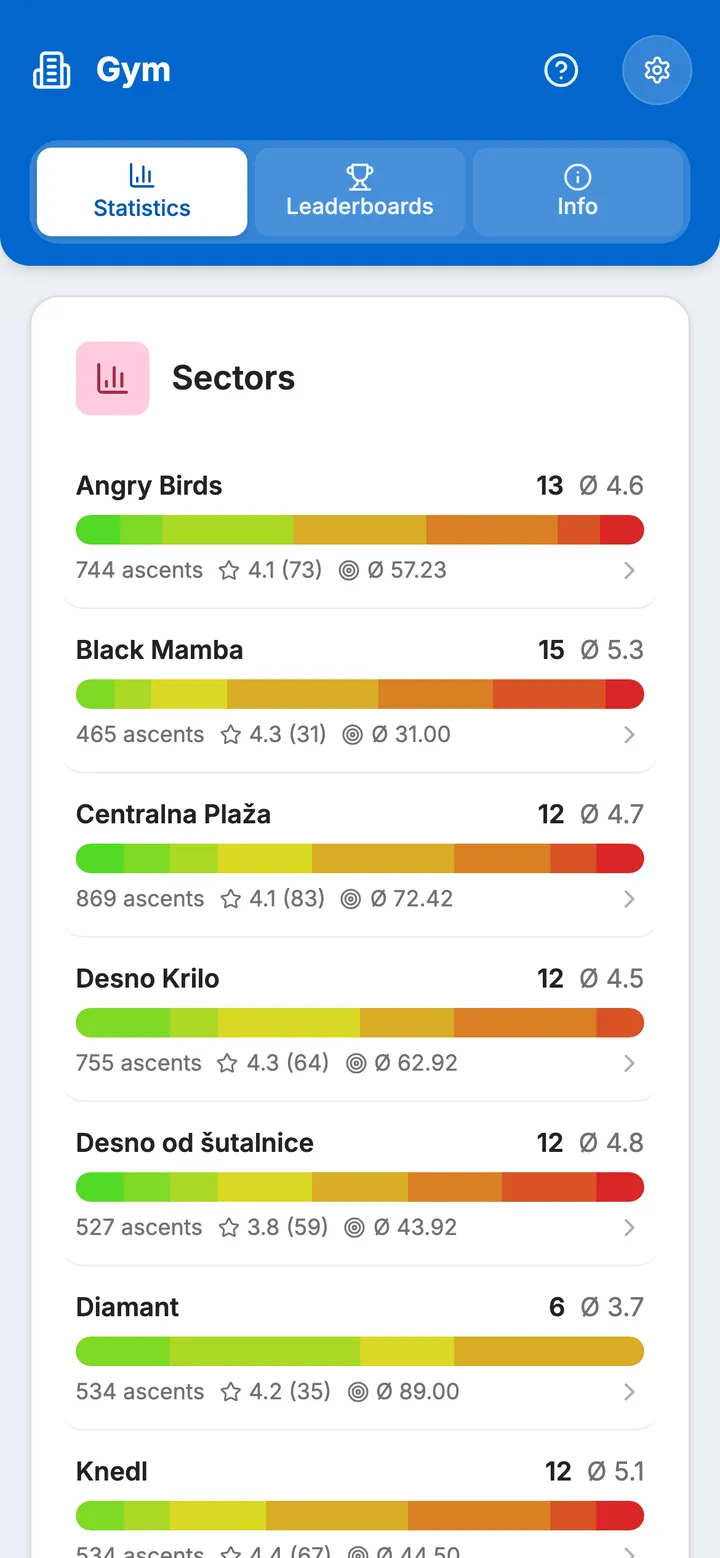
Climbers can rate what they climb from one to five stars, pick the grade it felt like and leave a comment. Each sector shows its grade spread, its ascents and its average rating, so you see which walls climbers like.
- Grade check, for boulders: Balvanko lists the boulders where a notable share of climbers picked a harder or an easier grade
- Ratings and comments on each setter’s boulders, in the routesetting statistics
- How to read a sector row: boulders and average grade (Ø), ascents, star rating with the number of ratings, and ascents per boulder (target icon)
Questions
Routesetting software: common questions
How do we plan a sector reset in a climbing gym?
In Balvanko, pick the sector and the date, in the routesetting tab or on the sector itself, and choose the boulders that come down with it. The reset calendar marks it as planned, and the list of resets counts down the days to it.
How do routesetters know which resets they are assigned to?
An admin assigns setters to each planned reset in Balvanko. Each setter finds it in their own routesetting tab and accepts or declines, with a reason if they decline, and the reset shows how many have confirmed. An assignment sends no notification, so tell your team when you assign them.
How do we know when a boulder’s grade is off?
When climbers log a boulder, they can pick the grade it felt like. Balvanko compares those personal grades with the set grade and lists the boulders where a notable share of climbers picked a harder or an easier grade, so the setter can check them. Routes get ratings and comments, but no grade comparison.
What happens to climbers’ projects when a sector is reset?
A climber who marked a boulder as a project gets a notification in the Balvanko app up to eight days before its planned removal date, unless they have turned boulder notifications off. Planning the reset more than a week ahead makes sure it is sent. When the reset is executed, climbers keep their logs, ratings and comments.
Can we plan resets for rope routes and spraywalls as well as boulders?
Yes. In Balvanko, resets work the same for boulder, route and spraywall sectors. Routes are added with French grades and take their height from the sector, which you set once. Climbers rate routes like boulders, and the statistics tab has a view for each of your gym’s disciplines. The comparison of personal grades with set grades is for boulders only.
Can routesetters log their working hours in Balvanko?
Yes, with Balvanko’s work tracking. Give a setter the worker role and they record their hours and jobs in the app; the admin sees them per person and per month. Work entries are kept apart from resets, so executing a reset does not log anyone’s hours.
What does routesetting software do?
Routesetting software, also written route setting software, keeps a climbing gym’s reset schedule in one place: which sector comes down when, which boulders or routes go with it and who sets them. After the reset it shows how climbers climbed and rated the new set. Balvanko does this for boulders, routes and spraywalls.
Running a competition at your gym? How each format scores
A demo for your gym
See Balvanko on your own walls
In a 20-minute demo we show it with your sectors, grades and colours.
€80/month per gym · free for your climbers
No commitment · we’ll tailor the demo to your gym